


Jan 20 2008
Heartbeat 2 Howto
Important note:
Heartbeat is now obsolete and has moved to a new stack available on Clusterlabs. For simple high availability project using a virtual IP, try out keepalived that does monitoring and failover with just a simple configuration file.
Since version 2, Heartbeat is able to manage more than 2 nodes, and doesn’t need “mon” utility to monitor services.
This fonctionnality is now implemented within Heartbeat.
As a consequence, this flexibility and new features may make it harder to configure.
It’s intresting to know version 1 configuration files are still supported.
Installation
Heartbeat source files are available from the official site http://www.linux-ha.org. Redhat Enterprise compatible rpms can be downloaded from the Centos website (link given from Heartbeat website). Packages are built pretty quickly as source version is 2.1.0 when rpm is 2.0.8-2 at the time this article was made. 3 rpms are needed:
heartbeat-pils
heartbeat-stonith
heartbeat
We are going to monitor Apache but the configuration remains valid for any other service: mail, database, DNS, DHCP, file server, etc…
Diagrams
Failover or load-balancing
Heartbeat supports Active-Passive for the failover mode and Active-Active for the load-balancing.
Many other options are possible adding servers and/or services; There are many many possibilities.
We will focus on load-balancing, only a few lines need to be removed for failover.
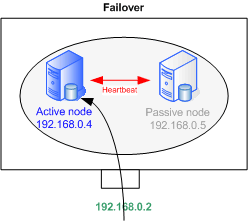 |
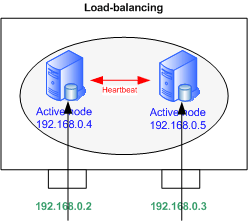 |
Configuration
In this setup, the 2 servers are interconnected through their eth0 interface.
Applicative flows come on eth1, that is configured as in the diagram below, with addresses 192.168.0.4 and .5
Addresses on eth0 have to be in a sub-network dedicated to Heartbeat.
These addresses must appear in /etc/hosts on every node.
3 files must be configured for Heartbeat 2. Again, they are identical on each node.
In /etc/ha.d/
- ha.cf
- authkeys
In /var/lib/heartbeat/crm/
- cib.xml
ha.cf
ha.cf contains the main settings like cluster nodes or the communication topology.
use_logd on
# Heartbeat packets sending frequency
keepalive 500ms # seconds - Specify ms for times shorter than 1 second

# Period of time after which a node is declared "dead"
deadtime 2
# Send a warning message
# Important to adjust the deadtime value
warntime 1
# Identical to deadtime but when initializing
initdead 8
updport 694

# Host to be tested to check the node is still online
# The default gateway most likely
ping 192.168.0.1
# Interface used for Heartbeat packets
# Use the serial port,

# "mcast" and "ucast" for multicast and unicast
bcast eth0
# Resource switches back on the primary node when it's available
auto_failback on
# Cluster Nodes List
node n1.domain.com
node n2.domain.com
# Activate Heartbeat 2 Configuration

crm yes
# Allow to add dynamically a new node to the cluster
autojoin any
Other options are available such as compression or bandwidth for communication on a serial cable. Check http://linux-ha.org/ha.cf
authkeys
Authkeys defines authentication keys.
Several types are available: crc, md5 and sha1. crc is to be used on a secured sub-network (vlan isolation or cross-over cable.
sha1 offers a higher level of secuirity but can consume a lot CPU resources.
md5 sits in between. It’s not a bad choice.
auth 1
1 md5 secret
Password is stored in clear text, it is important to change the file permissions to 600.
cib.xml
<cib>
<configuration>

  <crm_config/>
  <nodes/>
  <resources>
    <group id="server1">

      <primitive class="ocf" id="IP1" provider="heartbeat" type="IPaddr">
        <operations>
          <op id="IP1_mon" interval="10s" name="monitor" timeout="5s"/>
        </operations>
        <instance_attributes id="IP1_inst_attr">
          <attributes>
            <nvpair id="IP1_attr_0" name="ip" value="192.168.0.2"/>
            <nvpair id="IP1_attr_1" name="netmask" value="24"/>
            <nvpair id="IP1_attr_2" name="nic" value="eth1"/>
          </attributes>
        </instance_attributes>
      </primitive>

      <primitive class="lsb" id="apache1" provider="heartbeat" type="apache">
        <operations>
          <op id="jboss1_mon" interval="30s" name="monitor" timeout="20s"/>
        </operations>
      </primitive>
    </group>

    <group id="server2">

      <primitive class="ocf" id="IP2" provider="heartbeat" type="IPaddr">
        <operations>
          <op id="IP2_mon" interval="10s" name="monitor" timeout="5s"/>
        </operations>
        <instance_attributes id="IP2_inst_attr">
          <attributes>
            <nvpair id="IP2_attr_0" name="ip" value="192.168.0.3"/>
            <nvpair id="IP2_attr_1" name="netmask" value="24"/>
            <nvpair id="IP2_attr_2" name="nic" value="eth1"/>
          </attributes>
        </instance_attributes>
      </primitive>

      <primitive class="lsb" id="apache2" provider="heartbeat" type="apache">
        <operations>
          <op id="jboss2_mon" interval="30s" name="monitor" timeout="20s"/>
        </operations>
      </primitive>
    </group>
  </resources>

  <constraints>
    <rsc_location id="location_server1" rsc="server1">
      <rule id="best_location_server1" score="100">
        <expression_attribute="#uname" id="best_location_server1_expr" operation="eq"
        value="n1.domain.com"/>
      </rule>
    </rsc_location>

    <rsc_location id="location_server2" rsc="server2">
      <rule id="best_location_server2" score="100">
        <expression_attribute="#uname" id="best_location_server2_expr" operation="eq"
        value="n2.domain.com"/>
      </rule>
    </rsc_location>

    <rsc_location id="server1_connected" rsc="server1">
      <rule id="server1_connected_rule" score="-INFINITY" boolean_op="or">
        <expression id="server1_connected_undefined" attribute="pingd"
        operation="not_defined"/>
        <expression id="server1_connected_zero" attribute="pingd" operation="lte"
        value="0"/>
      </rule>
    </rsc_location>

    <rsc_location id="server2_connected" rsc="server2">
      <rule id="server2_connected_rule" score="-INFINITY" boolean_op="or">
        <expression id="server2_connected_undefined" attribute="pingd"
        operation="not_defined"/>
        <expression id="server2_connected_zero" attribute="pingd" operation="lte"
        value="0"/>
      </rule>
    </rsc_location>
  </constraints>

</configuration>
</cib>
It’s possible to generate the file from a Heartbeat 1 configuration file, haresources located in /etc/ha.d/, with the following command:
python /usr/lib/heartbeat/haresources2cib.py > /var/lib/heartbeat/crm/cib.xml
The file can be split in 2 parts: resources and constraints.
Resources
Resources are organized in groups (server1 & 2) putting together a virtual IP address and a service: Apache.
Resources are declared with the <primitive> syntax within the group.
Groups are useful to gather several resources under the same constraints.
The IP1 primitive checks virtual IP 1 is reachable.
It executes OCF type IPaddr script.
OCF scripts are provided with Heartbeat in the rpm packages.
It’s also possible to specify the virtual address, the network mask as well as the interface.
Apache resource type is LSB, meaning it makes a call to a startup script located in the usual /etc/init.d.
The script’s name in the variable type: type=”name”.
In order to run with Heartbeat, the script must be LSB compliant. LSB compliant means the script must:
- return its status with “script status”
- not fail “script start” on a service that is already running
- not fail stopping a service already stopped
All LSB specifications can be checked at http://www.linux- ha.org/LSBResourceAgent
The following time values can be defined:
- interval: defines how often the resource’s status is checked
- timeout: defines the time period before considering a start, stop or status action failed
Constraints
2 constraints apply to each group of resources:
The favourite location where resources “should” run.
We give a score of 100 to n1.domain.com for the 1st group.
Hence, if n1.domain.com is active, and option auto_failback is set to “on”, resources in this group will always come back there.
Action depending on ping result. If none of the gateways answer ping packets, resources move on another server, and the node goes to standby status.
Score -INFINITY means the the node will never ever accept these resources if the gateways are unreachable.
Important Notes
Files Rights
/etc/ha.cf directory contains sensible data. Rights have to be changed to be accessed by the owner only – or the application will not launch.
chmod 600 /etc/ha.d/ha.cf
The /var/lib/heartbeat/crm/cib.crm file has to belong to hacluster and group haclient. It must not be accessible by other users.
chown hacluster:haclient /var/lib/heartbeat/crm/cib.crm
chmod 660 /var/lib/heartbeat/crm/cib.crm
cib.xml is accessed in write mode by Heartbeat. Some files are created at the same time.
If you need to edit it manually, stop Heartbeat on all nodes, remove cib.xml.sig in the same directory, edit cib.xml on all nodes, and restart Heartbeat.
It’s advised to use crm_resource to bring modifications (see section below).
hosts files
The /etc/hosts file must contain all the cluster nodes hostnames. These names should be identical to the result of ‘uname -n’ command.
Services Startup
Heartbeat starts Apache when the service is inactive. It is better to disable Apache automatic startup with chkconfig for instance, as it may take a while to boot, Heartbeat could start it a second time.
chkconfig httpd off
There is a startup script in /etc/init.d/. To launch Heartbeat, run “/etc/init.d/hearbeat start”. Yu can launch Heartbeat automatically at boot time:
chkconfig heartbeat on
Behaviour and Tests
The following actions simulate incidents that may occur at some stage, and alter the cluster’s health. We study Heartbeat’s behaviour in each case.
Apache shutdown
Local Heartbeat will restart Apache. If the reboot fails, a warning is sent to the logs. Heartbeat won’t launch the service anymore then. The virtual IP address remains on the node. However, the address can be moved manually with Heartbeat tools.
Server’s Shutdown or Crash
Virtual addresses move to other servers.
Heartbeat’s Manual Shutdown on one Node
Heartbeat stops Heartbeat. Virtual addresses are moved to other nodes. The normal procedure is to run crm_standby to turn the node into standby mide and migrate resources accross.
Node to node cable disconnection
Each machine thinks it’s on its own and takes the 2 virtual IPs. However, it is not really a problem as the gateway keeps on sending packets to the last entry in the ARP table. A ping on the broadcast address sends duplicates.
Gateway disconnection
This could happen in 2 cases:
– The gateway is unreachable. In this case, the 2 nodes remove their virtual IP address and stop Apache.
– The connection to one of the nodes is down. Addresses move to the other server which can normally reach the gateway.
All simulations allow to maintain the cluster up except if the gateway is gone. But this is not a cluster problem…
Tools
Heartbeat’s health can be checked via different ways.
Logs
Heartbeat sends messages to the logd daemon that stores them in the /var/log/messages system file.
Unix Tools
Usual Unix commands can be used. Heartbeat creates sub-interfaces that you can check with “ifconfig” or “ip address show”. Processes status can be displayed with the startup scripts or with the “ps” command for instance.
Heartbeat Commands
Heartbeat is provided with a set of commands. Here are the main ones:
- crmadmin: Controls nodes managers on each machine of the cluster.
- crm_mon: Quick and useful; Displays nodes status and resources.
- crm_resource: Makes requests and modifies resources/services related data. Ability to list, migrate, disable or delete resources.
- crm_verify: Reports the cluster’s warnings and errors
- crm_standby: Migrate all node’s resources. Useful when upgrading.
Maintenance
Service Shutdown
When upgrading or shutting Apache down, you may proceed as follow:
- Stop Apache on node 1 and migrate the virtual address on node 2:
crm_standby -U n1.domain.com -v true - Start upgrading n1 and restart the node:
crm_standby -U n1.domain.com -v false - Resources automatically fail back to n1 (if cib.xml is properly configured)
Proceed the same way on n2
Rem: The previous commands can be run from any node of the cluster.
It is possible to switch the 2 nodes on standby at the same time; Apache will be stopped on the 2 machines and the virtual addresses deleted until it comes back to running mode.
Machine Reboot
It is not required to switch the node to standby mode before rebooting. However, it is better practice as resources migrate faster, detection time being inexistant.
Resource Failure
Example: Apache crashed and doesn’t restart anymore, all group resources are moved to the 2nd node.
When the issue is resolved and the resource is up again, the cluster’s health can be checked with:
crm_resource –reprobe (-P)
and the resource restarted:
crm_resource –cleanup –resource apache1 (ou crm_resource -C -r apache1).
It will move automatically back to the original server.
Adding a New Node to the cluster
In Standby
If the cluster contains 2 nodes connected with a cross-over cable, you then will need a switch for the heartbeats network interfaces.
You first need to add new node’s informations. Edit the /etc/hosts files on the current nodes and add the node’s hostname. /etc/hosts contents must be copied accross to the new node. Configure Heartbeat in the same way as other nodes.
ha.cf files must contain the “autojoin any” setting to accept new nodes on the fly.
On the new host, start Heartbeat; The should join the cluster automatically.
If not, run the following on one of the 1st nodes:
/usr/lib/heartbeat/hb_addnode n3.domain.com
The new node only acts as a failover, no service is associated. If n1.domain.com goes in standby, resources will move to n3. They will come back to the original server as soon as it comes back up (n1 being the favourite server).
With a New Service
To add a 3rd IP (along with a 3rd Apache), you need to follow the above procedure and then:
– Either stop Heartbeat on the 3 servers and edit cib.xml files
– Or build similar files to cib.xml, containing new resources and constraints to be added, and add them to the cluster in live. This is the preferred method. Create the following files on one of the nodes:
newGroup.xml
<group id="server3">
  <primitive class="ocf" provider="heartbeat" type="IPaddr" id="IP3">
    <operations>
      <op id="IP3_mon" interval="5s" name="monitor" timeout="2s"/>
    </operations>
    <instance_attributes id="IP3_attr">
      <attributes>
        <nvpair id="IP3_attr_0" name="ip" value="192.168.0.28"/>
        <nvpair id="IP3_attr_1" name="netmask" value="29"/>
        <nvpair id="IP3_attr_2" name="nic" value="eth1"/>
      </attributes>
    </instance_attributes>
  </primitive>

  <primitive class="lsb" provider="heartbeat" type="apache" id="apache3">
    <operations>
      <op id="apache3_mon" interval="5s" name="monitor" timeout="5s"/>
    </operations>
  </primitive>
</group>
newLocationConstraint.xml
<rsc_location id="location_server3" rsc="server3">
  <rule id="best_location_server3" score="100">
    <expression attribute="#uname" id="best_location_server3_expr" operation="eq"
    value="n3.domain.com"/>
  </rule>
</rsc_location>
newPingConstraint.xml
<rsc_location id="server3_connected" rsc="server3">
  <rule id="server3_connected_rule" score="-INFINITY" boolean_op="or">
    <expression id="server3_connected_undefined" attribute="pingd"
    operation="not_defined"/>
    <expression id="server3_connected_zero" attribute="pingd" operation="lte"
    value="0"/>
  </rule>
</rsc_location>
Add n3 constraints
cibadmin -C -o constraints -x newLocationConstraint.xml
cibadmin -C -o constraints -x newPingConstraint.xml
Add n3 resources
cibadmin -C -o resources -x newGroup.xml
n3 resources should start right away.
Note: Adding constraints can be done one at a time. If you try to add 2 constraints from within the same file, only the first will be set.
“expression_attribute” in your resource constraints is invalid (the underscore doesn’t belong). It should be “expression attribute”
Thanks for the howto. It really help me to understand Heartbeat V2 a bit more as I am struggling to configure my servers to use V2.
If I need to configure for a failover setup instead of load-balancing, what should I change in your example?
FYI, I am currently running failover using V1 with 2 nodes, which works fine but I need to add a 3rd node which now require me to setup V2. My required setup is as follows :
Shared IP : 10.1.1.2
LB1 (10.1.1.10) – Primary/Lead node
LB2 (10.1.1.11) – Secondary node should LB1 go offline
LB3 (10.1.1.12) – Backup node. Will only takeover IP if both LB1 and LB2 goes offline
Any help is greatly appreciated. Thanks again.
Hi!
Im configuring HA-Cluster with HeartBeat. I have the same question than Allie Syadiqin:
What points in config should I change to have a failover cluster rather than a load-balancing?
Thanks in advance!
Hi,
I wrote this a while ago but if my memory is correct, you need to remove the whole block as you don’t need the 2nd IP nor the service anymore. You also need to remove associated constraints indeed in the following block.
Look at how a 3rd resource is added below and that’s basically what you need to remove.
I just saw the IPs on the schema don’t match (192.168 should be 10.0), but the .3 IP and the service on the 2nd server are no more needed.
If I wrote a failover howto, people would ask for load-balancing 😉
Hi Dave,
In configuration step you say that both servers are connected between eth0 interface and this interface have to be in a subnetwork
dedicated to heartbeat.
Also, you say that we have to configure eth1 interfaces with addresses as 192.168.0.4 and 192.168.0.5.
I’m not sure that understand it totally, so i think i have to configure as down:
– eth0 connect directly between servers, not to the local network. (for example. ip 192.168.1.2 and .3)
– eth1 connect to the local network and to internet. (pc – switch – internet) with different addresses of eth0
It’s that correct?
Thanks and excuse my poor english 😉
Hi, that’s exactly it. eth1 are your production IPs while eth0 is a different subnet for heartbeats only.
It could be on the same network but it wouldn’t be secure
In the above XML, are that 10.0.0.2 and 10.0.0.3 are virtual IP’s, one for each server group.
yes they’re virtual IPs. They should be 192.168.0.2 and 3 though to match the pic. I just made the change on the post.
thanks for the great tutorial!!!
thanks for this nice tutorial as it really helped me as i am very new to linux
wat will be in haresources file if i will try it with heartbeat 1 .
Heartbeat 1 is a complete different story since it doesn’t manage services.
Check http://www.netexpertise.eu/en/mysql/mysql-failover.html but Heartbeat 2 is way more advanced and powerful
In 3 node system which one will be selected DC for the first time
will it be order in which they are in cib or something else
as in two node second one is elected as current DC ,
please reply
Thanks in advance
Look at location rules above, you can change the score for each one of your nodes
what is the default order of resource failover and DC election in more than three node if i dont specify any lovation constraint as i have gone through them but TL dont want them to be included in cib
is there any way to do it or any doc specifying this default behaviour of heartbeat2 ????
please reply
thanks in advance
hi,
previously i was trying to establish four node architecture using heartbeat v1 and i got the problem but now i shifted to heartbeat 2 and trying same architecture
4 node like
Node A, B, C, D.
and
one resource Ipaddr
but here i am facing problem with ip failover as
1- Node A goes down then with default setting and without constraint which node will get the ip resource ????.what will be the default behaviour of cluster in such schenario.
2- if node B gets resource in above case then when i make node A up and node B down then resource is failing back on node A which is not expected either it should move to node C or D which is desired
cib.xml
no-quorum-policy — ignore
resource-stickiness —- INFINITY
resource-failure-stickiness—- 0
node description
then resource description having monitor operation on
no constraints
ha.cf
crm — yes
autojoin —- yes
node A B C D
auto failback off
any one having information related it please help in need…….
thanks in advance
in Heartbeat 2 cluster of three nodes how to stop auto failback:
as in cib i am having default resource stickiness —- INFINITY, and no constraint.
1- IF i stop heartbeat on node A failover happens and ip resource shifts to node B stays
there if i start heartbeat on node A, but
2- When i give init 6 on node A again failover happens and ip resource shifts to node B but as node A again joins the cluster after reboot (heartbeat is on at run level services boot time) ip resource fails back to node A which is not expected
if any one have solution then please help…..
Thanks
Hi,
1/ I have no clue. Test it and let everyone know
2/ It may come back to the first node? Same, if you have a chance to test it
Hi all,
Whether the heartbeat version 2(more than two node architecture) is it a stable one which can be used for the production purpose.
If no please let us know the stable release of heartbeat version which can be used for the production purpose with more than two nodes.
Waiting for the reply……….
Regards,
Dangtiz
According to the official website, the last stable version is 3.0.3.
I’ve been using Heartbeat 2 for a few years on production servers and I’ve had no problem so far
Thanks for the reply,
As we are using the SUSE Linux Enterprise Server 10 SP2 in our production servers and also we cant upgrade to higher version as they are working in real time so can you suggest us which stable Heartbeat version to use with respect to this SLES 10 SP2.
Waiting for the reply,
Regards,
Dangtiz.
All I can say is thanks! simple to the point and so useful!
where can I download haresources2cib.py.
nagrik
Your how to is very useful as I searched whole night and seems no one site mentioned V2 will not use “haresources” file, I have been played by the box whole night until I find this page.
All is working fine now.
Very Goooooooooooooooooooooooooooooooood.