


Avr 10 2009
Monitorer les ressources AS400 avec MRTG
Les ressources CPU et memoire des AS400 peuvent être récupérées avec le protocole SNMP si le service a été activé. Les valeurs ne sont pas directement exploitable et doivent être retravaillées avant d’être affichées. Toutes ces commandes sont exécutées depuis un serveur Linux. Vérifiez sur votre distribution Linux pour installer snmpwalk qui doit très certainement fournir un package.
Données CPU
Il est préconisé d’extraire le CPU d’un IBM i avec l’OID SNMP .1.3.6.1.4.1.2.6.4.5.1.0 qui retourne une valeur sur 10000. Il faut donc la diviser par 100 pour l’obtenir en pourcentage.
Le 2me inconvénient est que seule la valeur entière est retournée. Elle est de ce fait erronée, puisqu’arrondie à la valeur inférieure.
L’OID HOST-RESOURCES-MIB::hrProcessorLoad.2 sur un i5 520 retourne directement cette valeur en pourcentage.
Pour l’exemple:
mrtg@serveur:~> snmpwalk -c $COMMUNITY -v1 $I5IP .1.3.6.1.4.1.2.6.4.5.1.0;
SNMPv2-SMI::enterprises.2.6.4.5.1.0 = Gauge32: 2380
mrtg@serveur:~> snmpwalk -c $COMMUNITY -v1 $I5IP .1.3.6.1.2.1.25.3.3.1.2.2
HOST-RESOURCES-MIB::hrProcessorLoad.2 = INTEGER: 24
Données Mémoire
Premièrement, MaxBytes, représentant la quantité max de mémoire, peut s’obtenir via snmpwalk (en KB) auquel on applique quelques changements:
expr `snmpwalk -v1 -c $COMMUNITY $IP hrMemorySize.0 | awk ‘{ print $(NF-1) }’` \* 1024
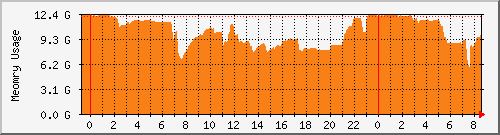
Et voici un script shell qui calcule la RAM utilisée à partir des valeurs SNMP. On ne peut pas l’obtenir directement comme vous pouvez le constater:
#!/bin/sh
IP=$1
COMMUNITY=$2
SNMP_VERSION=$3
# RAM used
NB_ELEMENTS=`snmpwalk -v $SNMP_VERSION -c $COMMUNITY $IP hrStorageIndex \
| awk '{ print $NF }' | tail -n 1`

RAM_USED=0

for i in `seq 1 $NB_ELEMENTS`; do
  TYPE_ELEMENT=`snmpget -v $SNMP_VERSION -c $COMMUNITY $IP hrStorageDescr.$i \
  | awk '{ print $NF }'`
  if [ "$TYPE_ELEMENT" != "RAM" ]; then
    continue
  fi

  BLOCK_SIZE=`snmpget -v $SNMP_VERSION -c $COMMUNITY $IP hrStorageAllocationUnits.$i \
  | awk '{ print $(NF-1) }'`
  NB_BLOCKS_USED=`snmpget -v $SNMP_VERSION -c $COMMUNITY $IP hrStorageUsed.$i \
  | awk '{ print $NF }'`
  RAM_USED=`expr $NB_BLOCKS_USED \* $BLOCK_SIZE`
  TOTAL_RAM_USED=`expr $TOTAL_RAM_USED + $RAM_USED`
done

TOTAL_RAM_USED=`expr $TOTAL_RAM_USED`

echo $TOTAL_RAM_USED
echo $TOTAL_RAM_USED
Configuration MRTG
La configuration MRTG exploitant ces valeurs ressemble à ceci. Elle permet de générer le graphique ci-dessus. Ces valeurs peuvent bien sûr être utilisées par tout autre outil de surveillance comme Zabbix ou Cacti par exemple.
# La méthode classique affichant 2 fois la même valeur
# Target[AS400.cpu]:.1.3.6.1.2.1.25.3.3.1.2.2&.1.3.6.1.2.1.25.3.3.1.2.2:COMMUNITY@IP
# Ou via le script comme décrit ici
Target[AS400.cpu]:`/home/mrtg/get-as400-cpu.sh IP COMMUNITY 1`
RouterUptime[AS400.cpu]: COMMUNITY@IP
MaxBytes[AS400.cpu]: 100
Title[AS400.cpu]: Charge CPU AS400
PageTop[AS400.cpu]: <H1>Charge CPU AS400</H1>
Unscaled[AS400.cpu]: ymwd
ShortLegend[AS400.cpu]: %
YLegend[AS400.cpu]: Utilisation CPU
Legend1[AS400.cpu]: Charge CPU active
LegendI[AS400.cpu]: CPU
Options[AS400.cpu]: growright,nopercent,gauge
Colours[AS400.cpu]: RED#e13c13,RED#e13c13,RED#e13c13,RED#e13c13

# De même pour l'utilisation mémoire
Target[AS400.mem]:`/home/mrtg/get-as400-memory.sh IP COMMUNITY 1`
RouterUptime[AS400.mem]: COMMUNITY@IP
MaxBytes[AS400.mem]: 12129927168
Title[AS400.mem]: Utilisation mémoire AS400
PageTop[AS400.mem]: <H1>Utilisation mémoire AS400</H1>
Unscaled[AS400.mem]: ymwd
YLegend[AS400.mem]: Utilisation mémoire
Legend1[AS400.mem]: Utilisation mémoire
LegendI[AS400.mem]: mémoire
Options[AS400.mem]: growright,nopercent,gauge
Colours[AS400.mem]: ORANGE#F88017,ORANGE#F88017,ORANGE#F88017,ORANGE#F88017