


Apr 10 2009
Monitoring AS400 Resources with SNMP
AS400 CPU and memory resources monitoring can be handled with the SNMP protocol if SNMP service has been enabled. Values are not directly exploitable and need to be worked on before being displayed. All of these commands were executed on a Linux server. Check your Linux distribution to install snmpwalk, there’s a package for it most likely.
CPU Monitoring with SNMP
It is recommended to monitor IBM i CPU load with SNMP OID .1.3.6.1.4.1.2.6.4.5.1.0 that returns a value based on 10,000 units. It needs then to be divided by 100 to get a percentage.
The 2nd disadvantage is that the result is slightly wrong, the integer part only is being returned.
However, OID HOST-RESOURCES-MIB::hrProcessorLoad.2 from an IBM i gives the correct value in percentage.
For instance:
monitoring@server:~> snmpwalk -c $COMMUNITY -v1 $AS400_IP .1.3.6.1.4.1.2.6.4.5.1.0;
SNMPv2-SMI::enterprises.2.6.4.5.1.0 = Gauge32: 2380
monitoring@server:~> snmpwalk -c $COMMUNITY -v1 $AS400_IP .1.3.6.1.2.1.25.3.3.1.2.2
HOST-RESOURCES-MIB::hrProcessorLoad.2 = INTEGER: 24
Memory Monitoring with SNMP
First, MaxBytes and max amount of memory can be retrieved with snmpwalk (in KB) with a bit of processing:
expr `snmpwalk -v1 -c $COMMUNITY $AS400_IP hrMemorySize.0 | awk ‘{ print $(NF-1) }’` \* 1024
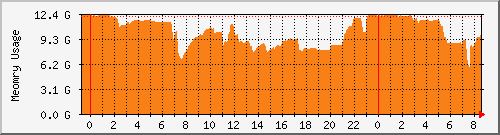
Here is a shell script that computes memory usage from SNMP values (from Cacti forum). It is not a straightforward value as you can see.
#!/bin/sh
IP=$1
COMMUNITY=$2
SNMP_VERSION=$3
# RAM used
NB_ELEMENTS=`snmpwalk -v $SNMP_VERSION -c $COMMUNITY $IP hrStorageIndex \
| awk '{ print $NF }' | tail -n 1`

RAM_USED=0

for i in `seq 1 $NB_ELEMENTS`; do
  TYPE_ELEMENT=`snmpget -v $SNMP_VERSION -c $COMMUNITY $IP hrStorageDescr.$i \
  | awk '{ print $NF }'`
  if [ "$TYPE_ELEMENT" != "RAM" ]; then
    continue
  fi

  BLOCK_SIZE=`snmpget -v $SNMP_VERSION -c $COMMUNITY $IP hrStorageAllocationUnits.$i \
  | awk '{ print $(NF-1) }'`
  NB_BLOCKS_USED=`snmpget -v $SNMP_VERSION -c $COMMUNITY $IP hrStorageUsed.$i \
  | awk '{ print $NF }'`
  RAM_USED=`expr $NB_BLOCKS_USED \* $BLOCK_SIZE`
  TOTAL_RAM_USED=`expr $TOTAL_RAM_USED + $RAM_USED`
done

TOTAL_RAM_USED=`expr $TOTAL_RAM_USED`

echo $TOTAL_RAM_USED
echo $TOTAL_RAM_USED
MRTG Configuration
The resulting MRTG configuration looks like the following. It will generate usage graphs like above. These AS400 values can of course be handled by any other monitoring tool that support the SNMP protocol such as Zabbix or Cacti for example.
# Standard method displays twice the same value
# Target[AS400.cpu]:.1.3.6.1.2.1.25.3.3.1.2.2&.1.3.6.1.2.1.25.3.3.1.2.2:COMMUNITY@IP
# Or via a script as described here
Target[AS400.cpu]:`/home/mrtg/get-as400-cpu.sh IP COMMUNITY 1`
RouterUptime[AS400.cpu]: COMMUNITY@IP
MaxBytes[AS400.cpu]: 100
Title[AS400.cpu]: AS400 CPU Load
PageTop[AS400.cpu]: <H1>AS400 CPU Load</H1>
Unscaled[AS400.cpu]: ymwd
ShortLegend[AS400.cpu]: %
YLegend[AS400.cpu]: CPU Utilization
Legend1[AS400.cpu]: Active CPU Load
LegendI[AS400.cpu]: CPU
Options[AS400.cpu]: growright,nopercent,gauge
Colours[AS400.cpu]: RED#e13c13,RED#e13c13,RED#e13c13,RED#e13c13

# Same for memory usage
Target[AS400.mem]:`/home/mrtg/get-as400-memory.sh IP COMMUNITY 1`
RouterUptime[AS400.mem]: COMMUNITY@IP
MaxBytes[AS400.mem]: 12129927168
Title[AS400.mem]: AS400 Memory Usage
PageTop[AS400.mem]: <H1>AS400 Memory Usage</H1>
Unscaled[AS400.mem]: ymwd
YLegend[AS400.mem]: Memory Usage
Legend1[AS400.mem]: Memory Usage
LegendI[AS400.mem]: Memory
Options[AS400.mem]: growright,nopercent,gauge
Colours[AS400.mem]: ORANGE#F88017,ORANGE#F88017,ORANGE#F88017,ORANGE#F88017
I’ve just stubled upon this site as400-news.com, could I just borrow the technical
data from the web site or do I need special permission?. I’m writing a project for school.
James
No problem, some piece of information was found on the net as well
It’s really a cool and helpful piece of information. I’m glad that you shared this
helpful information with us. Please stay us up to date like this.
Thank you for sharing.