


Jun 18 2009
Reset SST Password with no Reboot
SST password is required to access iSeries maintenance section and IBM systematically needs it. However, it is also not unusual to lose the password.
Most SST password reset procedures require you to run an IPL (reboot) in degraded mode. This is not absolutely needed if you have an HMC server.
Open a 5250 session to connect to the IBM i and launch under QSECOFR
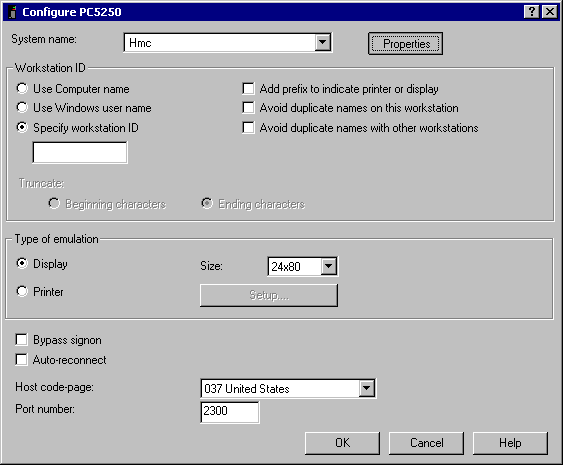
CHGDSTPWD PASSWORD(*DEFAULT)Connect to the HMC in 5250 as well
ID: Q#hmc, Port: 2300
And leave the session open
Now connect to the HMC with the WEB-based System Manager. We’ll run on version 6 in here but the method remains the same on newer versions.
Navigate in “Service Applications”
-> “Service Focus Point”
-> “Maintenance Utilities”
Select your system
In the menu, click on “Selected”, “Service Control Panel Functions”
and select appropriate partition
In the menu, click on “Partition Functions” -> “Dedicated Service Tools Activation”
Click on OK
Back to the HMC 5250 session, a new menu is showing up:
Dedicated Service Tools (DST) – Opening
Log in as QSECOFR/QSECOFR
Now reset the SST password.
SST menu is now reachable with the new password
Under a AS400 session as QSECOFR run:
STRSST